
CM1 supercell storm simulation
Agent infrastructure for simulation and 3D data
Simulation, scan, and sensor data in the cloud, with tools agents can call on the full-resolution data.
Your team reviews what they find in a live 3D scene.
3D data agents can work with
A transient run or a lidar scan is gigabytes of meshes, fields, and time steps that an agent cannot open. Left with the files, it writes one-off parsers and still cannot see the result. The CoDim MCP server gives agents spatial tools that run on the full data in the cloud, in the same live scene as your team.
How agents connect →Where does wall shear peak in Run 42, and how does it compare with Run 41?
I'll look at both runs in CoDim.
codim dataset_overview(Run 42)
4.2M cells, 3 fields, 240 time steps
codim extremes_locate(wall_shear)
Peak at the mirror root, step 212
codim mesh_compare(Run 41)
Peak 18% higher, 4 cm further aft
codim view_point_at(mirror root)
Scene camera on the peak
codim thread_comment
Posted to the review thread
Wall shear peaks at the mirror root, 18% above Run 41. The shared scene is aimed at it, with a note for the team.
Inspect
Structure, fields, value ranges, and where values sit in space, returned as compact structured results instead of files.
Analyze
Probes, extremes, comparisons between runs, and filters that run on every cell of the full-resolution data in the cloud.
Show
Agents set up the live 3D scene, aim the camera at what they found, and post it to the team's thread.
Machines produce it. People and agents act on it.
Simulation fields, scans, and sensor data describe the physical world in 3D and over time. They are too large to pass around as files and too spatial for tools built around tables. CoDim carries them from whatever produced the data to whoever acts on it next.
Produced by
CFD and FEA solvers, AI surrogates, lidar and photogrammetry scans, and robot fleets.
Carried by CoDim
Streamed, filtered, probed, and rendered on cloud GPUs and CPUs, next to the data.
Used by
Agents over MCP, engineers in a browser, ML pipelines in Python, and the users of your product.
Built for the data deep tech runs on
One core for simulation, physics AI, geoscience, and robotics data, from streaming to analysis and review.
Carotid artery blood flow, with particles advected through a 3D vector field.
Simulation and CAE
CFD, crash, and structural results post-processed and reviewed at full resolution by everyone on the program.
Physics AI
Surrogate predictions next to solver ground truth, at the scale of the training data.
Geoscience
Ensembles, drillholes, and uncertainty volumes for geologists, engineers, and partners.
Robotics and digital twins
Scans, toolpaths, and sensor data streamed into one scene, inside the tools operators already use.
Live solver streams
A running solver sends each step over Apache Arrow Flight. It connects outbound, so it works from behind a firewall, and every run can be saved as a dataset.
Filter pipelines
Clip, slice, threshold, contour, streamlines, gradients, vorticity, and Q-criterion run next to the data, chained into pipelines that update when an input changes.
Storage built for time steps
Mesh structure is stored once per run and each time step as its own cloud object, so scrubbing reads only the step on screen.
Measurement and probes
Distances, angles, areas, and exact field values anywhere in the model.
Time series and ensembles
Scrub transient results and step through realizations without reloading.
Comparison
Linked panes for runs, designs, or a prediction next to ground truth.
Works out of the box with PyVista, downloaded millions of times per month
PyVista is the open-source Python library for 3D meshes and simulation results, co-created by CoDim's CEO.
Install codim and any PyVista dataset goes to a shared 3D scene in one line, from the scripts
and notebooks you already run.
import codimimport pyvista as pvmesh = solver.result() # any PyVista datasetmesh.codim.upload("Run 42", project="Wing study")mesh.codim.show()baseline = pv.DataSet.codim.load("Run 41")- Send solver output to CoDim from any Python script
- Pull CoDim datasets back into Python for analysis
- Interactive 3D in Jupyter
- An API coding agents already write well
- Scoped access tokens for scripts and unattended jobs
Review what agents find, together
Agents, engineers, reviewers, and customers work in the same 3D scene, from any browser.
Share a link
Links open the exact data, display style, camera, and time step in any browser.
Presence and follow
See who is in the scene and what they're running. Present to a remote meeting or jump to a colleague's camera.
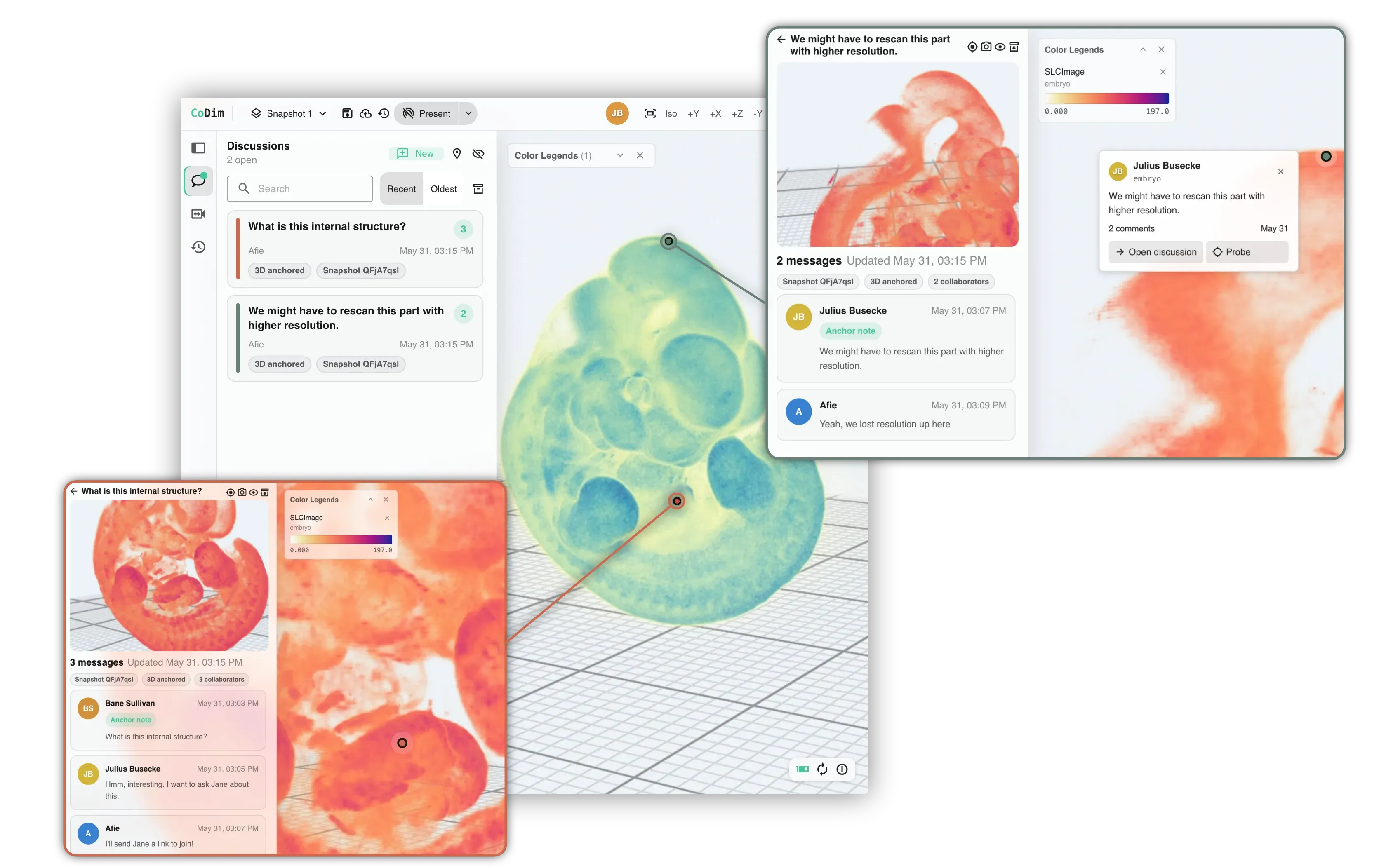
Comments on geometry
Threads pin to a point on the 3D data, with @mentions and resolve.
Scene history
Every edit to a scene, by a person or an agent, is logged with who made it, and snapshots of the full scene are kept.
Build CoDim into your product
Viewers, comparisons, timelines, comments, and probes are already built, and the data streaming, compute, and analysis behind them come with the SDK. Your users stay in your product.
For developers →import { createClient } from '@codimensional/client'import { CoDimView } from '@codimensional/react'// Your backend issues the session. Users sign in to your app.const client = createClient({ embed: { acquire: acquireSession } })const workspace = await client.viewer.workspaces.open({})await workspace.addDataset(run.datasetId)export function Results() {return <CoDimView client={workspace.allocation.primaryView} />}Nothing to deploy
CoDim runs the GPUs, render servers, and job queues behind rendering, inference, analysis, and data streaming, and scales them with your users and jobs. Your team installs a Python package or the SDK. There is no cluster, GPU driver, or render node to provision, patch, or size.
Jobs and pipelines
Chain filters, inference, and post-processing into jobs. Each step runs on the hardware it needs, and results stream back into the scene.
Browser or cloud GPU
Views render in the browser or on a cloud GPU, and a live session can switch between them without losing its state.
One backend, every interface
Start a job from Python, review it in the app, embed it with the SDK, or hand it to an agent. Each one works on the same compute and the same results.
Point an agent at the dataset that breaks your tools.
The transient run nobody can open, the scan too big to share, the solver output your team only sees as screenshots. Send it over and we will load it into CoDim and connect your agent to it.